
1. Prologue: The Add-On Debate (or, a False Choice)
1.1 “Use an Add-On” vs “Everyone Should Code”
There are two stock answers that reliably surface whenever automation in BIM is mentioned:
- you should learn to code, you’re nobody if you don’t;
- you’re being stupid: just use an add-on.
The second one is disarmingly simple: spend those five bucks and just use an add-on. Why waste time building scripts when someone has already packaged the solution, polished the interface, and put a price tag on it? The implication is that anything else is unnecessary friction, a kind of ideological stubbornness disguised as technical curiosity. Or you’re just being cheap.

The second answer comes from the opposite direction and is no less absolute: you need to learn how to code. Not just Dynamo, but Python, APIs, data structures, maybe even GitHub while we’re at it. If you don’t, you’re delegating your thinking to black boxes and forfeiting control over your own work. Or you’re simply being old and dumb.
Both positions present themselves as pragmatic and a little bitchy, usually delivered with a tone of mild impatience. And both reduce a complex professional question to a binary choice that feels reassuring precisely because it avoids nuance.
What’s interesting is that these two positions are often framed as opposites, when in reality they share the same flaw: they treat automation as a tooling problem, rather than as a question of practice, responsibility, and context.
1.2 The Debate That Never Goes Away
The add-on versus coding debate keeps resurfacing because the conditions that generate it never really change.
Software grows in complexity faster than organisations grow in literacy, deadlines stay tight, margins stay at the top. Meanwhile, teams are asked to produce more, faster, with fewer opportunities to stop and reflect on how work is actually being done. In this environment, automation becomes a pressure valve: a promise that we can absorb complexity without reorganising ourselves around it.

Every few years, the surface technology changes. Yesterday, it was visual scripting. Today, it’s AI-powered shit. Tomorrow it will be something else entirely. But the underlying tension remains the same: do we invest time in understanding our tools, or do we outsource that understanding?
The answer might not be what you think. This is why the debate is often emotionally charged. It isn’t really about Dynamo, or add-ons, or even coding. It’s about time, competence, and professional identity. About whether knowledge is something we cultivate internally, or something we buy when needed.
1.3 Who Wins When Automation Becomes a Product
Framing automation as a product choice has very clear winners. Vendors benefit, obviously. If automation is something you purchase, then complexity becomes a market opportunity rather than a shared problem to be addressed structurally. Each friction point can be solved by another button, another coin in the market, another licence purchased.
Organisations benefit too. Buying an add-on is easier than investing in standards, training, and internal coherence. It shifts responsibility outward and creates the comforting illusion that automation can be “plugged in” without changing how people work.
On the other hand, framing coding — or scripting, or computational thinking — as something everyone should learn also has its beneficiaries. It aligns well with a meritocratic narrative where structural issues are reframed as individual shortcomings. If automation doesn’t work, it’s because people aren’t skilled enough, not because the system they operate in is incoherent. Trust me. I had a boss who told me, once, that I had no place in the design firm if I didn’t learn how to use Dynamo stat, by myself, as he did. Yeah, he was an asshole.
Both framings quietly avoid a more uncomfortable question: who is responsible for the logic embedded in our tools and workflows? That question sits at the centre of this article because Dynamo, whether one chooses to use it or not, forces that responsibility back into view by being explicitly malfunctioning, at times, as automation does.
And that, more than any technical limitation or learning curve, is why people keep arguing about it.

2. Dynamo, Without the Mythology
2.1 What Dynamo Actually Is (and What It Isn’t)
Let’s clear the air from the start, in case you have no idea what I’m talking about. Dynamo is a visual programming environment embedded in Autodesk Revit (and other stuff) that lets users turn logic into workflows without writing traditional text code. Instead of lines of code, you connect nodes that describe data operations, geometry manipulation, or parameter updates. In that sense, it is programming, but in a visual, node-based form that lowers some barriers to entry.
It is not a magic button that solves every “BIM problem” out there, nor is it just a plugin you can use to add a couple of new commands to Revit. It does not replace understanding of the model, nor does it automatically surface the best workflow for your use case. It is a tool for expressing computation and logic, not a pre-cooked productivity feature.
What I find Dynamo to be good for:
- explicitly describing the logic of tasks, especially when they involve rules or patterns;
- pushing beyond what the Revit UI allows by exposing internal data and relationships;
- serving as a bridge between manual modelling and scripted logic.
What Dynamo is not:
- some kind of button you can click for arbitrary automation;
- a universal replacement for domain expertise or disciplined standards;
- a fully packaged solution requiring no thought or configuration.
This distinction matters because much of the criticism you hear (“Dynamo doesn’t work” or “nobody uses it anymore”) stems from misunderstanding what kind of thing Dynamo actually is, not from its adoption per se.

2.2 Has the Hype Died?
This is where things get murky, because unlike commercially sold software, Dynamo doesn’t publish user numbers or annual reports. There isn’t a central authority releasing “Dynamo usage stats,” and package downloads or forum activity are imperfect proxies.
What we can observe from public signals:
- The official Dynamo forums is alive and kicking, with regular threads on troubleshooting, releases, and community events including hackathons. Conversations are frequent and span technical categories like Revit interaction, data manipulation, and geometry workflows.
- There continues to be multiple training offerings, from beginner introductions to advanced workflows, including official Autodesk-aligned courses, on-demand training, and professional certification pathways.
- Community discussions and learning resources (e.g., YouTube playlists, AU classes, and ecosystem tutorials) remain active, suggesting ongoing interest and investment in learning the tool.
- Historical signals from earlier forums and package manager data indicated substantial interest — at least years ago — for example, discussions implied millions of package downloads across the user base, even if that isn’t the same as unique users.
What this isn’t evidence of:
- a definitive peak and decline in adoption;
- a reliable count of total users worldwide;
- a clear indicator that Dynamo is being abandoned in practice, as some have claimed.
In other words, the claim that “the hype is over” is partly true only if you equate hype with novelty or viral attention. What’s probably more accurate is that Dynamo has moved from being a buzzword to something like a niche foundational skill in many BIM practices: not as glamorous as it used to be, but still actively used where it matters.
2.3 Dynamo is Infrastructure
Most users are accustomed to thinking of software in terms of features: commands you click in a ribbon that do a thing for you. “Add wall,” “create schedule,” “tag elements”. These are discrete features with predictable outputs.
Dynamo is not that, of course.
Dynamo is better understood as a layer of infrastructure. In many ways, it functions like the plumbing of a digital workflow: you don’t use it every day like a button, but when the default features don’t scale or can’t express a rule, infrastructure is what carries the load.
This is why phrasing Dynamo as an alternative to add-ons misses the point: add-ons are features, often designed to solve one particular problem well. Dynamo is not a feature, it’s a framework in which features can be created, tested, adapted, and maintained. It’s the difference between buying a pre-built tool and having the capacity to build and adapt your own.
And that reframing — Dynamo as infrastructure — sets the stage for everything that follows: why standards matter, why learning curves are real, and why the choice between a script and an add-on doesn’t have a clear, definitive answer and isn’t just a matter of convenience.
3. Three Uses of Dynamo (and Why Only Two Matter Here)
Dynamo is often discussed as if it had a single purpose, usually reduced to whatever use case the speaker happens to care about most. In practice, it tends to be used in three broad ways.
First, automating repetitive tasks. This is the most common and the most visible use: renaming elements, populating parameters, batch-editing data, generating views, sheets, or schedules. It’s the entry point for many users, because the payoff is immediate and the pain it addresses is familiar.
Second, leveraging what Revit already knows how to do, but doesn’t readily expose. Dynamo can surface internal relationships, parameters, and behaviours that exist under the hood but are inaccessible — or impractical to use — through the standard interface. In this role, Dynamo is less about speed and more about access.
Third, describing complex geometry, the glamorous one. Dynamo can act as a parametric geometry engine, capable of generating forms and systems that would be tedious or impossible to model manually. This is the use case most often showcased in talks and demos, and the one that tends to dominate the imagination.
We will largely ignore the third. Not because it isn’t valid, but because it is not where most of the friction around Dynamo actually surfaces.
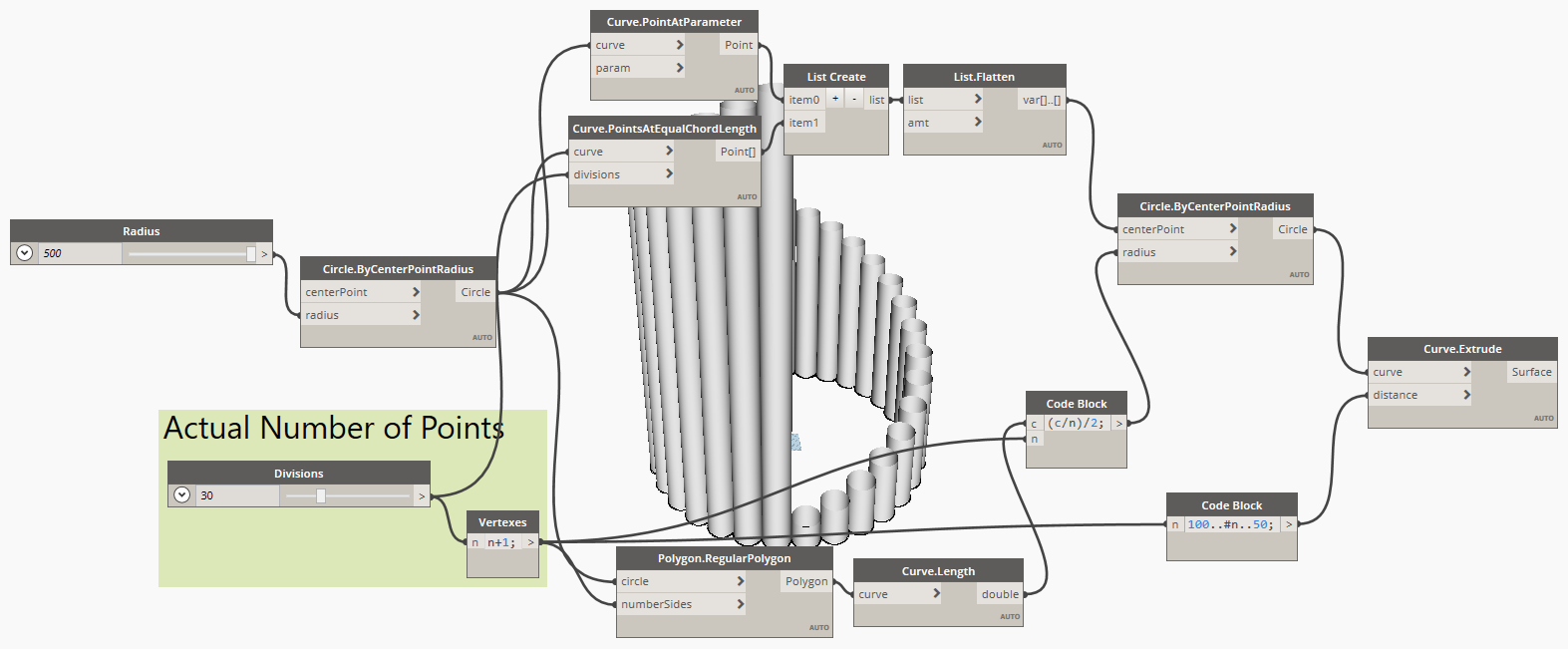
The real debate — the one that fuels the add-on versus scripting argument, the one tied to standards, time, responsibility, and professional practice — happens in the first two uses.
Automation of repetition, and access to Revit’s latent capabilities, are where Dynamo stops being a curiosity and starts becoming an organisational and cultural question. Everything that follows builds from there.
4. Automation of Repetition: Harmless, Useful, or Dangerous?
Repetition is usually where automation enters the conversation. Few people wake up wanting to “do automation”; many wake up wanting to stop doing the same mind-numbing operation for the hundredth time. Rename this. Copy that. Fill this parameter again. Fix the same inconsistency across twenty views.
On the surface, automating repetition feels uncontroversial. If a task is boring, mechanical, and time-consuming, why wouldn’t we hand it over to a machine? And in many cases, that instinct is not only reasonable, it’s correct.
The problem is that repetition is an ambiguous signal: sometimes it points to work that should indeed be automated; other times, it is a symptom of something broken upstream. Treating both cases the same is where automation starts to do harm.
4.1 When Automating Repetition Makes Sense
Automation makes sense when repetition is structural, predictable, and stable.
If a task follows clear rules, applies consistently across projects, and produces the same kind of output every time, automating it is not just efficient, it is responsible. Renaming elements according to a shared convention. Populating parameters based on known relationships. Generating views or sheets that follow an agreed logic. These are not creative decisions repeated many times: they are decisions already made that simply need to be applied reliably, and I suck at repetitive tasks, so chances are that a good script will also save me from making mistakes.
In these cases, automation reduces noise, removes opportunities for error, and frees attention for work that actually requires judgement. Used this way, Dynamo embeds previous thinking into a repeatable form. Which is good.
Crucially, this kind of automation assumes that the rules already exist: someone has agreed on how things should be named, classified, or structured, and Dynamo merely enforces that agreement at scale.
But is this always the case?
4.2. When Automation Hides a Structural Problem
Repetition of a tedious task becomes dangerous when it is treated as a problem in itself, rather than as a clue to something broken. If a team is repeatedly fixing the same issues, re-entering the same information, or compensating for the same inconsistencies, automation can easily become a way to make a bad workflow run faster. Instead of asking why a task exists, we rush to eliminate its symptoms.
This is where the logic described in Modern Times and Metropolis becomes relevant, as we saw a couple of weeks ago: when work is fragmented into ever smaller tasks, it starts to look mechanisable. But that apparent efficiency comes at a cost: the loss of context, responsibility, and feedback loops. Automation, in this scenario, doesn’t empower designers — as it should — but insulates the system from critique.
A Dynamo script that fixes data at the end of the process may be hiding the fact that the data should never have been wrong in the first place. A batch operation that reconciles inconsistencies may be compensating for the absence of shared standards or clear ownership. In other words, automation can become a form of denial: a way to avoid addressing structural issues by smoothing over their consequences.
4.3 The SDD Problem
This leads to a recurring pattern in many organisations: the emergence of the SDD, the “Specific Dynamo Dude”. There is someone who knows how the script works, someone who runs it when things break, someone who fixes the model when production fails or produces unexpected results. This person is often highly competent, well-intentioned, and overburdened with stuff that shouldn’t be their problem. Automation, in this case, has concentrated responsibility on the shoulders of someone whose only fault is to be competent.

When repetitive tasks are automated without being formalised into shared rules and roles, they become opaque. The script, instead of an infrastructure, becomes a band-aid that only a specific person knows how to apply: if that person leaves, the band-aid eventually comes loose, and automation becomes a liability rather than an asset.
This clearly isn’t a tooling issue. It’s a governance issue.
If automation always encodes decisions, the question is whether those decisions are explicit, documented, and collectively owned, or whether they emerge under emergency (put intended), increasing fragility disguised as efficiency.
This is why automating repetition cannot be discussed in isolation. Before asking how to automate, we need to ask what is being repeated, why, and who is accountable for the rules being enforced. And that inevitably brings us to the prerequisite nobody likes to talk about: standards.
5. The Prerequisite Nobody Likes: Standards
Standards are rarely where conversations about automation begin, but they are almost always where they end. Or rather, where they should end, because every automation effort eventually collides with the question of whether there is something coherent to automate in the first place.
Automation promises speed, but speed without direction is just random momentum that, in a digital environment, tends to amplify whatever conditions are already present.
5.1 Automation Without Standards is just Faster Chaos
When there are no shared rules, automation fails enthusiastically.
A script will happily rename thousands of elements according to a convention that nobody agreed on, it will populate parameters that mean different things to different people, it will propagate inconsistencies across an entire model in seconds. Manual work at least fails slowly; automation fails at scale.
This is why the idea that automation can avoid standardisation is so dangerous. It feels efficient to fix things later with a script, but what you are really doing is postponing decisions that automation assumes have already been made. Standards are there to give automation something to enforce. Without them, automation becomes an accelerant applied to a fire you never bothered to extinguish.

5.2 Naming, Parameters, Templates: The Unsexy Foundations
When people say they “don’t have time for standards”, what they often mean is that they don’t have time for the slow, collective work of agreeing upon stuff in the first place. And when they say that everybody already works in the same way, even if the standard isn’t written anywhere, they’re lying to themselves, at best, or flat-out bullshitting you.
Naming conventions are the obvious example. If elements, views, and files are named arbitrarily, no amount of scripting will magically restore meaning: a Dynamo graph can apply a naming rule, but it cannot invent one that aligns with how people actually think and work.
The same is true for parameters. If parameters are duplicated, inconsistently defined, or semantically vague, automation can only shuffle confusion around. Templates, likewise, are often treated as static artefacts rather than as living contracts about how work is meant to happen.
Discipline is the missing word in most of these discussions: not discipline as in rigidity, but discipline as in care, the willingness to maintain coherence over time, even when shortcuts are available.
Standards are the boundary conditions that make automation meaningful.
5.3 Dynamo as an Amplifier of Order (or Disorder)
This is where Dynamo’s role becomes uncomfortably clear in the framework of automation.
Dynamo does not create order out of thin air, but certainly has the potential to amplify it. If your standards are clear, shared, and respected, Dynamo can enforce them with a consistency no human team can match. It can become a quiet guardian of coherence, catching deviations early and reducing friction.

If your standards are absent, contradictory, or aspirational at best, Dynamo will amplify that too: scripts will become brittle, exceptions will multiply, workarounds will stack on top of each other until the automation layer is more complex than the problem it was meant to solve. This is why Dynamo often feels fragile in poorly standardised environments and powerful in mature ones. The tool hasn’t changed. The context has.
Seen this way, Dynamo is not a shortcut around standards, nor a replacement for them, but it’s best seen as a diagnostic tool. If automation is painful, project-specific, unreliable, or dependent on heroic individuals, that discomfort is not a sign that Dynamo is the wrong choice: it is a sign that the underlying system lacks the shared structure needed to make it make sense as a technological choice.
And once that is acknowledged, the conversation about automation can finally move away from taste, preference, and productivity hacks toward responsibility, literacy, and long-term stewardship.
6. Add-ons: Tools, Crutches, or Contracts?
Add-ons tend to enter the automation conversation as a shortcut: faster, easier, already built. But that framing is too shallow. In practice, add-ons play a much more ambiguous role in the decision about where complexity lives, and who is expected to manage it. I know many excellent people who are building equally excellent add-ons, so I hope this section will do right by them.
6.1 Why Add-ons Are Attractive (and Often Necessary)
The appeal of add-ons is easy to understand: they work out of the box. They come with pretty interfaces, documentation, support channels, and update cycles that lift from your internal teams the responsibility to check whether the latest Dynamo release broke everything. They promise results without requiring every team to reinvent the same logic from scratch.
In many contexts, they are not just attractive: they are the most sensible choice.
When automation needs are occasional, project-specific, or driven by external requirements, building and maintaining in-house scripts may be unjustifiable, for instance. This is especially true when working with client-specific standards, regulatory constraints, or delivery formats that are unlikely to recur. In those cases, one-off automation is overhead.
Add-ons also make sense when the complexity they handle is generic rather than strategic. If a tool reliably solves a well-defined problem that many firms share, outsourcing that logic can be an efficient use of attention. Not every organisation needs to internalise every layer of its tooling stack: that’s anachronistic.
6.2 What You Gain: Speed, Polish, and Delegated Complexity
What add-ons really sell is not a solution but a structural delegation. Specifically, they delegate technical depth to specialists, maintenance to vendors, edge cases to people whose job it is to think about them. This delegation often results in speed: workflows that would take weeks to develop in-house are available immediately, wrapped in a coherent UI.
There is also polish. Add-ons tend to handle errors more gracefully, guide users through constrained choices, and reduce the cognitive load on non-specialists. In environments where consistency of output matters more than flexibility of process, this can be a genuine advantage. In this sense, add-ons can function as shared infrastructure for the industry: a way to stabilise common practices and avoid endless reinvention. Which is good.
6.3 What You Might Lose: Transparency, Adaptability, and Agency
The trade-off is not always obvious at first.
When logic is encapsulated inside an add-on, it becomes harder for people to see why the tool behaves the way it does. Decisions are embedded in code you don’t control, often optimised for the average use case, and that abstraction is comfortable until your context deviates from the assumed norm, the tool misbehaves and you have no idea how (and whether) to adapt your model for the inconsistency to be smoothed over.
Adaptability is the first casualty and everything breaks loose when things get tough, when a project demands a slight deviation: in those situations, you are limited to what the add-on exposes as configurable. If the tool doesn’t quite fit, the choice is often between bending your process to the tool or layering workarounds on top of it.
Agency is the deeper loss. Over time, reliance on add-ons can shift a team’s relationship with its tools from active to reactive. Automation becomes something you invoke, not something you understand and when it breaks, you wait. When it doesn’t quite do what you need, you adapt yourself instead.
None of this makes add-ons inherently bad. But it does mean they are not neutral.
Choosing an add-on is also choosing a contract: about responsibility, about control, and about how much of your practice you are willing to externalise. And this is where the conversation reconnects with Dynamo as a counterweight, a way to keep some portion of automation legible, adaptable, and owned, even in an ecosystem where delegation is often the rational choice.
7. “Dynamo Takes Too Much Time”: a Fair Criticism?
At some point in any conversation about Dynamo, someone will say it out loud: this takes too much time. And they’re not wrong. Learning Dynamo does take time. Building scripts definitely takes time. Maintaining them takes a lot of time. Compared to installing an add-on and clicking a button, the difference is immediately visible.
The mistake is not in acknowledging this cost, but in isolating it as if time were only spent when a Dynamo graph is open, and never elsewhere.
7.1 The Real Cost of Learning Dynamo
Learning Dynamo is not just about learning nodes: it involves understanding data structures, relationships between elements, and the internal logic of the model. It forces users to confront questions they can usually avoid: where information lives, how it propagates, and what assumptions are being made along the way. This is real work, and it is front-loaded. The first scripts are slow, fragile, and frustrating, progress is uneven, and results are rarely production-ready on the first pass.
What often goes unsaid is that this cost exists regardless of whether you use Dynamo or not. Add-ons do not remove complexity but they relocate it at best. Someone still had to understand the API, the data model, the edge cases: the difference is simply that this work was done elsewhere, by someone else, at some other time. The problem arises when users of add-ons are encouraged to believe that this understanding is optional, that they can benefit from automation without any literacy about the systems being automated. As we’ve already seen, that belief tends to resurface later as fragility, misconfiguration, and misplaced trust in tools that no longer quite fit.
7.2 Front-Loaded Effort, Long-Term Literacy
Dynamo demands effort upfront, but it repays that effort in a specific currency: a higher degree of literacy. Not literacy in the sense of becoming a developer, but in the sense of being able to read, question, and reason about automated behaviour. A user with basic Dynamo literacy may still rely on add-ons, but they are better equipped to understand what those add-ons are likely doing, where their limits lie, and when a mismatch between tool and context is occurring. This is the part that is often missed in time-based comparisons. The question is not “how long does this task take today?” but “what kind of understanding does this workflow cultivate over time?”
In other words, add-ons optimise for immediacy while Dynamo pushes for comprehension. Both are valid choices, but pretending they have the same long-term effects is misleading.
7.3 Discomfort, Emergencies, and the Automation Curve
Automation only works well under specific conditions: when tasks are repeatable, rules are stable, and scale justifies the effort. In emergencies — when deadlines shift, inputs change, or exceptions dominate — manual intervention will almost always be faster. Automation is not a panic tool; it is a system tool. The so-called automation curve reflects this: early on, automation slows you down; only after a threshold — of repetition, stability, and reuse — does it begin to pay off. Dynamo makes this curve visible and uncomfortable, because it exposes the cost before the benefit. Discomfort is frequently mistaken for inefficiency.
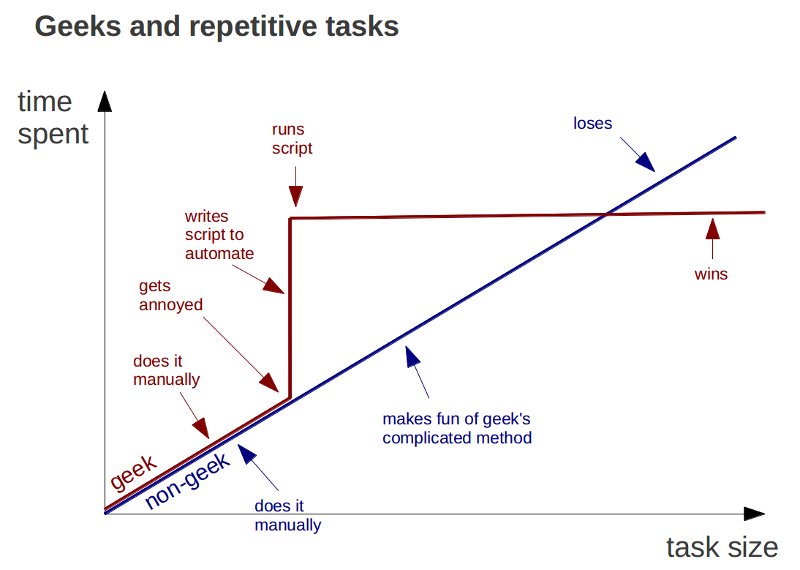
Add-ons often hide the curve by amortising it across a market. You step in after someone else has absorbed the discomfort, and that is perfectly reasonable but only if you remember that the curve still exists. When your context diverges from the one the tool was built for, the hidden cost reappears, often without warning.
This is where the problems discussed in the previous section resurface: tools that are fast but opaque, efficient but brittle, helpful until they suddenly aren’t. The issue is not that add-ons are used, but that they are used without the literacy needed to judge when they stop being appropriate.
Seen this way, the complaint that Dynamo takes too much time is valid but incomplete. The real question is not whether you pay the cost, but when, where, and by whom. Dynamo makes that cost explicit. Add-ons defer it. Neither option eliminates it. And understanding that is, in itself, a form of automation maturity.
Conclusion: Maturity, Literacy, and the End of the Tool Debate
By now, it should be clear that the recurring debate around Dynamo versus add-ons is a distraction, not because the choice doesn’t matter, but because it’s the wrong level of discussion. Tools are the visible surface of a much deeper question: how a practice relates to its own complexity, and whether it chooses to understand it, understand it and then outsource it, or pretend it doesn’t exist.
Automation maturity is not measured by how many scripts a team writes, nor by how many licences it owns. It is measured by where decisions live. By whether rules are explicit or implicit, shared or gatekept, documented or tribal. By whether automation reinforces coherence or merely accelerates inconsistency. Literacy sits at the centre of this. Not everyone needs to build Dynamo graphs, not everyone should, but everyone who relies on automation — whether through scripts, add-ons, or AI-assisted shit — needs a minimum level of understanding of what is being automated, how, and at what cost. Without that literacy, delegation turns into abdication and speed will come back to bite you in the ass.
This is why Dynamo matters even to those who rarely open it. It represents a posture: the willingness to confront structure and to accept that automation is never neutral. It always encodes values, assumptions, and responsibilities.
Saying “just use an add-on” is easy. Saying “everyone should learn to code” is easy, too. Both avoid the harder work of building shared standards, maintaining institutional memory, and cultivating judgment over convenience.
Using automation well is not about choosing the right tool. It is about choosing how to grow up as a practice.






No Comments