"All this he saw, for one moment breathless and intense, vivid on the morning sky; and still, as he looked, he lived; and still, as he lived, he wondered."
My Two Cents on Naming Conventions
How to Craft Names That Keep Humans Sane
Whenever I draft a new standard for a company that’s transitioning to BIM, I start from the naming convention of files and objects, because if you can’t name things, you can’t find them, and most certainly you can’t manage them. Recursively, I hear colleagues invoking the hype of the moment to defend that we’ll have no need for that. Right now, it’s AI. Therefore, I think it’s worthwhile to revisit why we need naming conventions in the first place. I’ll give you some examples, and then we’ll decide whether it’s something we’ll be able to forego in the near future.
Spoiler: it isn’t.
Prologue: Naming as World-Building
Names are often treated as a clerical ornament, a final layer we sprinkle on top of files, components, and documents once the “real work” is done. Yet anyone who has ever inherited a poorly named model — or worse, a folder where every file is called final_v3_definitive — knows that naming is not a cosmetic gesture and should be done beforehand. It is world-building in one of its most literal senses: you are shaping the environment in which people must navigate, search, and make decisions.
To design a naming convention is to distil into a single string of codes what usually comes as an ecosystem of relationships, with the final aim of defining how information moves, how it is recognised, and how it is recovered. In this sense, naming in Information Management has far more in common with designing a rule-based system that is active in constraining, guiding, and enabling behaviour. It should set expectations and, most importantly, it should teach people — and machines — how to inhabit a shared digital environment.
Let’s take, for instance, a naming convention for technical drawings. If you provide a portion of the name to indicate the type of drawing you’re looking at — as I did in many standards I built — you’re indicating that you want consistency: if drawings are labelled as Plans, Elevations, Sections and Details, you’re saying that, above a certain scale, you don’t want that mix and match of plans, details and sections that some kind of designer likes so much. There’s no code because the output should be organised differently.
On top of that, a name is metadata in disguise. A good naming system encodes stage, function, discipline, version, status, not because humans enjoy long strings of letters, but because the alternative is opacity, meaning people might not understand what the hell they’re dealing with. When metadata is missing, when models lack proper attributes, when documents circulate stripped from their context, as we can’t seem to understand what a Common Data Environment really is, names are the last line of defence between order and confusion. Hence, it must speak clearly.
And clarity must endure. The real test of a naming convention is not whether it works today, but whether it works when today’s team is gone. Projects outlive people; archives outlive memory. A well-designed naming system allows someone, years later, to see a file they’ve never seen and know what it’s about, to open that file and understand where they are in the lifecycle of that object. It lets future teams retrieve what they need without depending on oral history or institutional folklore.
Very much akin to this kind of folklore in spookiness.
In this light, naming is a form of that digital stewardship that’s part of the responsibilities of a BIM Coordinator. When you’re developing and enforcing a standard, you are not trying to impose rigidity, of course; you are building a system that’s navigable and, most importantly, that has the ability to stay navigable as it grows. That’s what I mean by “You are “designing for propagation:” ensuring that every name carries enough structure to be meaningful, enough pattern to be recognisable, and enough flexibility to continue evolving with the project.
A naming convention is a declaration of intent: This environment will remain intelligible. This information will remain usable. This work will remain findable.
That is the purpose. That is the promise. And that’s also where some people object. The objection, though not usually phrased with this propriety, underlines a tension as old as computing itself: searching versus sorting. The idea is that, while searching engines become increasingly better, you don’t need archiving systems and naming conventions in your explorations. We’ll tackle this concept later on. For now, I’ll just say that, when naming conventions work well, they do something paradoxical: they allow you to search by sorting. You make information discoverable by the way you place it into sequence.
What’s in a Name: the Function of that Standard
Just Whistle While You Work (and reduce cognitive load)
If the prologue frames naming as world-building, this first function deals with the most immediate, pragmatic consequence of that: you need a naming standard to help you find things while you work. Not after the fact, not during a post-mortem, not when the BIM Manager has a free hour to reorganise the CDE. In the middle of modelling, annotating, exporting, and coordinating, you need to reach for something and know exactly where it is and what it is.
This is the first brutal truth: people do not read names; they recognise patterns. Our working memory is not a search engine but a pattern-matching machine with extremely limited bandwidth, constantly juggling tasks, notifications, constraints, and deadlines. A naming convention that aligns with pattern recognition reduces cognitive load. One that doesn’t become friction and creates additional entropy because people, on top of working, need to remember abstruse codes and silently, cumulatively, corrosively, they burn up.
Like this.
A well-designed naming convention turns names into cues that allow you to no longer need to parse an entire document. You spot the discipline code, and you know if it’s yours. You identify the drawing type portion and know immediately if this is a plan or a fragment pretending to be one. These micro-recognitions shave seconds off every interaction and make for fewer opportunities for mistakes.
This is also why naming conventions are not just for archiving, despite how often they’re dismissed as such: a good naming system reduces the burden of interpretation, creates a shared visual grammar across the team, and allows people to move through the project environment without constantly guessing, asking, or opening files out of pure suspicion.
And this matters most during onboarding. When new collaborators join a project, the fastest way to lose time (and their trust) is to present them with an environment whose organisation must be deciphered from scratch, nobody can find stuff on their own, and they need to lean on senior members for orientation only. A coherent naming convention acts as implicit documentation: you learn the structure by looking at it, and infer meaning even before you know the full rules. This accelerates integration and reduces dependency on oral transmission — that same dangerous folklore you warned against in the prologue — so that people can have more time to talk to each other about stuff that really matters.
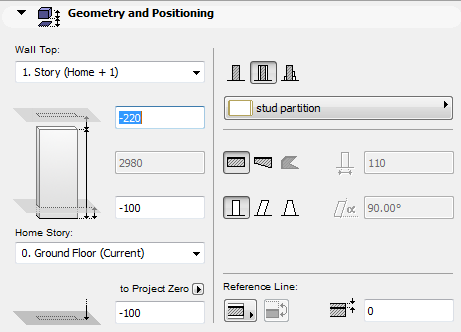
Now think about your favourite software of BIM authoring and imagine you’re trying to get some shit done. Let’s say, model a wall. Even if many pieces of BIM authoring software allow for searching, you are faced with a list and that list is in alphabetical order.
This is how the wall tool looked like in ACRICAD18
That’s the first reason why naming conventions need to be incremental and they need to start from what the use might be looking for.
Are you an architect modelling a whole building? Your first choice might be between exterior walls and interior walls. Are you an engineer? Maybe you prefer to divide them between structural and non-structural. Are you an interior designer? Your first choices might be between partition and finishing walls. It depends. Let me stress that again. It fucking depends. It’s all bloody subjective.
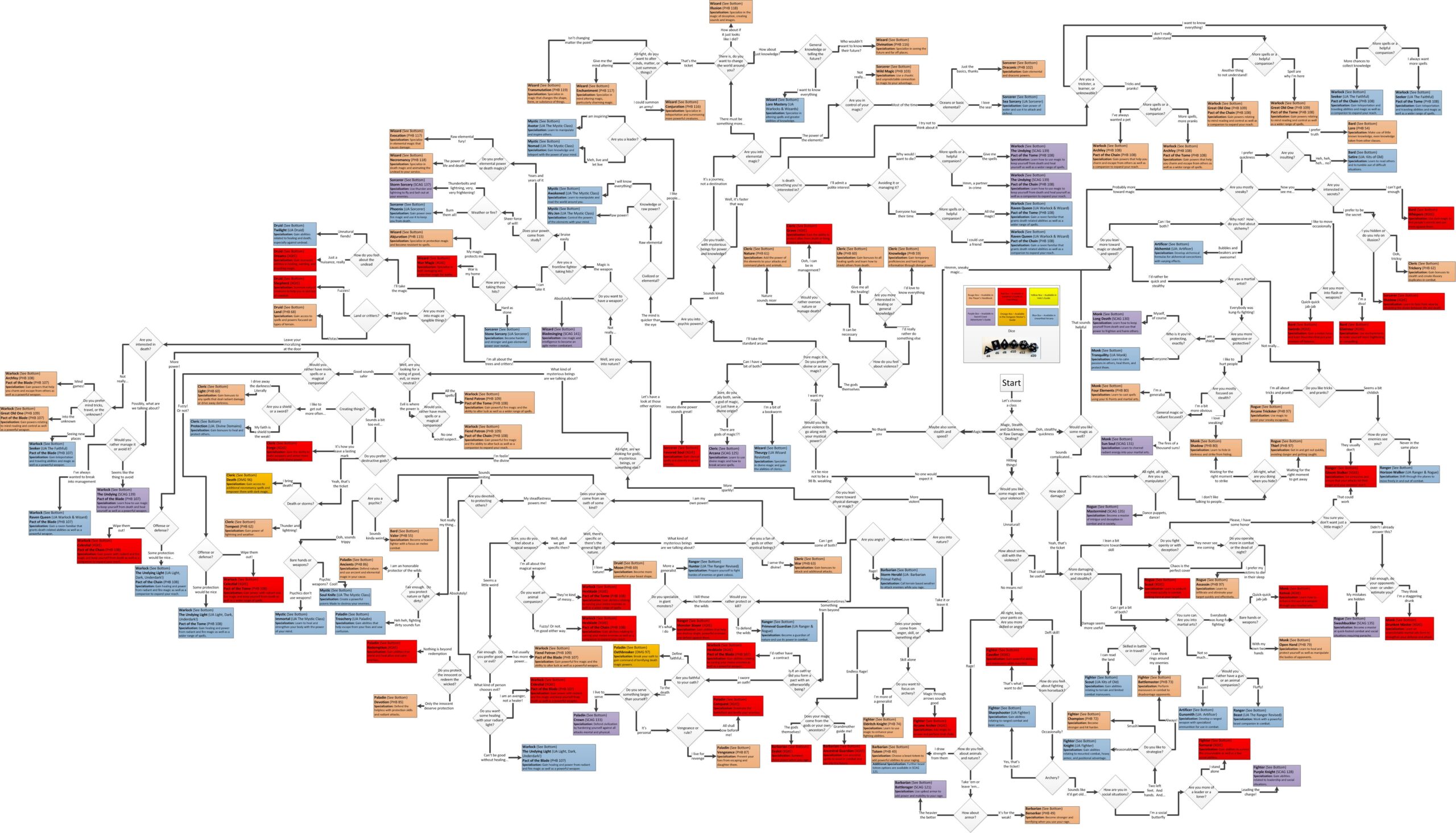
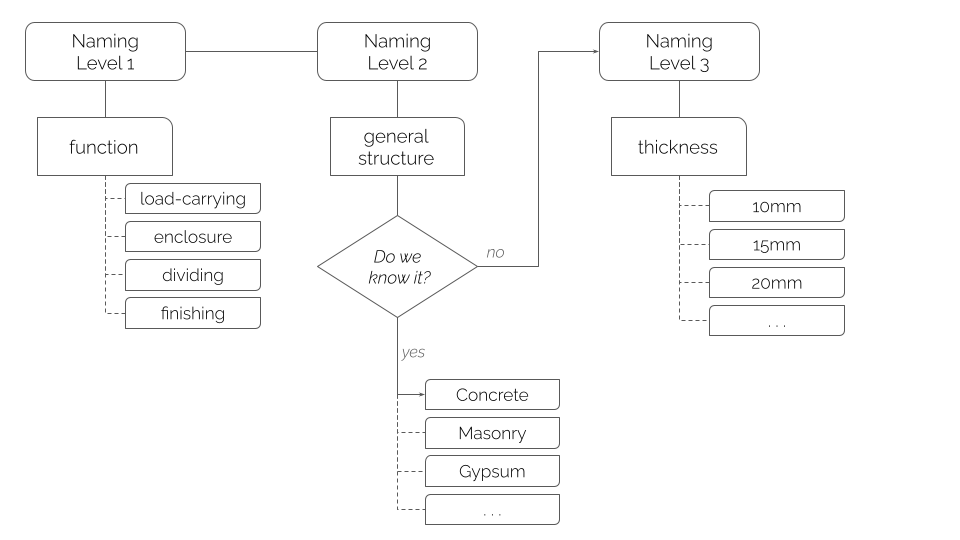
The tool that allows us to craft this kind of naming convention isn’t a spreadsheet. Not at first. It’s a decision tree.
For instance, this is a decision tree to decide which D&D class you might pick.
A Practical Example
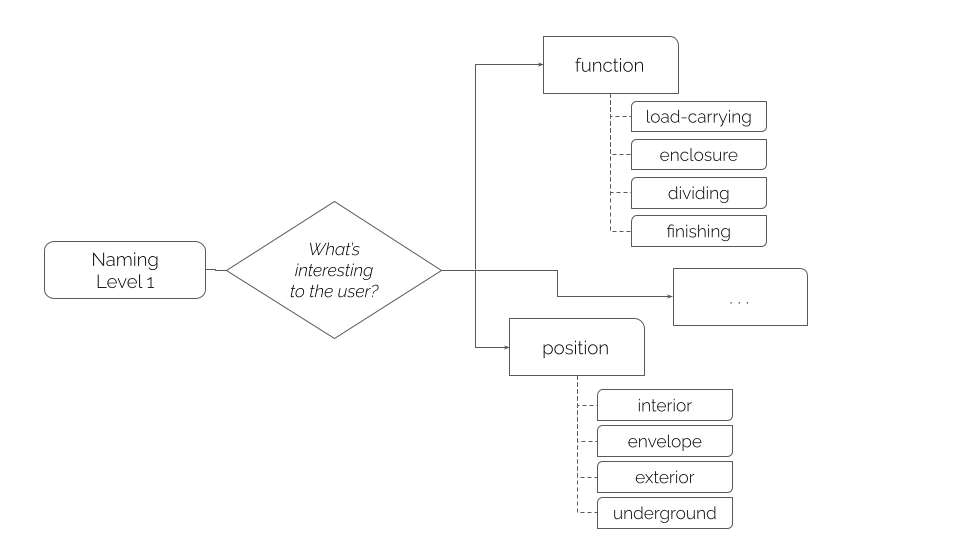
The first question you need to ask yourself is: what’s the first level of the naming?
In my experience, the relevant answers at these level might be two:
by function: load-carrying, enclosure wall, dividing wall, finishing wall;
by position/geometry: interior, envelope, exterior, underground.
Let’s make an example with walls.
So, if you follow that decision tree, the first portion of your naming code might look like this:
By Function:
3-letters code
Function
LCW
Load-carrying Wall
ENW
Enclosure Wall
DVW
Dividing Wall
FNW
Finishing Wall
By Position:
3-letters code
Position
INW
Interior Wall
ENW
Envelope Wall
EXW
Exterior Wall
UNW
Underground Wall
While you’re deciding this, it’s very important to remember that you’re not writing the next chapter of the Bible. This isn’t the Book of Arnold (you get it if you get it), it’s not something you decide once and then blindlessly apply to every project, especially if you’re an unspecialized design firm. If you’re designing a whole building, you might need the distinction between external and internal walls. But if you’re designing a park, they’re pretty much all going to be external: what’s the point of this? Your warning sign is repetition: if all your walls repeat a code in their name, chances are that code is useless, so you should turn that portion off.
Turn it Off
So, let’s assume that function is the way you want to go with your first portion of code. The process proceeds from there and asks: what’s the second thing users will ask themselves, after finding the wall with the function they needed? They have their bunch of Dividing Walls in front of them: what will they want next? Maybe it’s a hint to their general structure. It usually is. So, which kind of dividing wall do you want, kid? Is it gypsum? Is it bricks? Is it something else? This means that your wall naming, completed with the second level, might start looking like this.
Function (3-letters)
Stands for:
General Structure (2-letters)
Stands for:
LCW
Load-carrying Wall
CO
Concrete
MA
Masonry
MS
Metal Studs
…
ENW
Enclosure Wall
MA
Masonry
WO
Timber Wood
GL
Glass
CO
Concrete
…
DVW
Dividing Wall
GY
Gypsum
MA
Masonry
…
FNW
Finishing Wall
ST
Stone
CE
Ceramics
WO
Wood
…
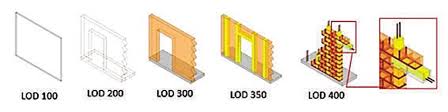
Now, this is where naming gets interestingly tangled up with LODs.
These things.
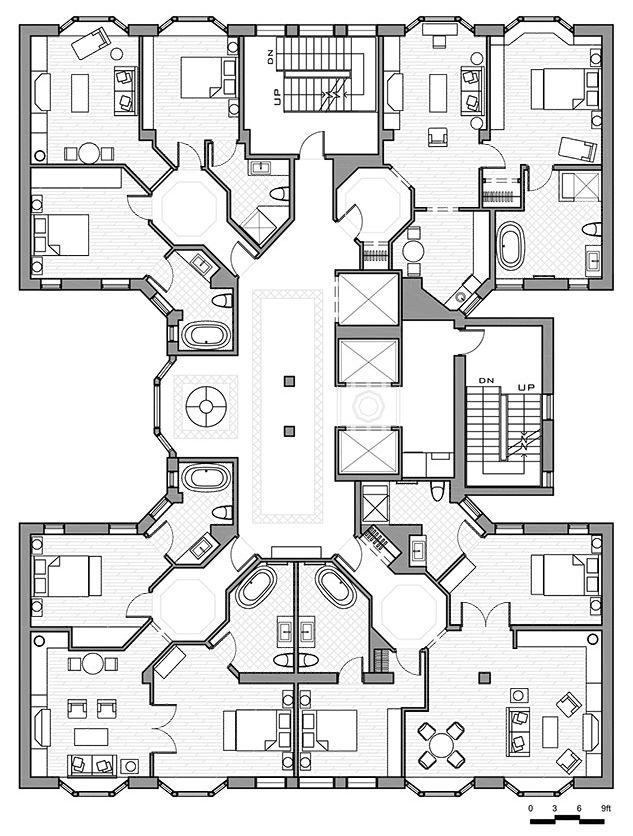
If you’re drafting a concept for a building — let’s say, the general division for the typical floor of a hotel — chances are you don’t know the exact structure of the wall yet. Your only information might be an educaded guess on the approximate thickness, based on the reasoning that generic partition wall might reasonably be either gypsum or bricks, gypsum is usually a 75mm stud + boards and bricks usually are 100 – 150 mm. You’ll want to be on the safe side, so chances are your generic wall is 150 mm.
This isn’t a blindspot BIM is here to fix. On the contrary, the designer can’t chose the structure of the wall at this point because it isn’t the right moment to do so. A badly crafted naming convention might push them not to make an educated guess about thickness but to anticipate a design decision that might not even be in their hands.
So, what does this mean?
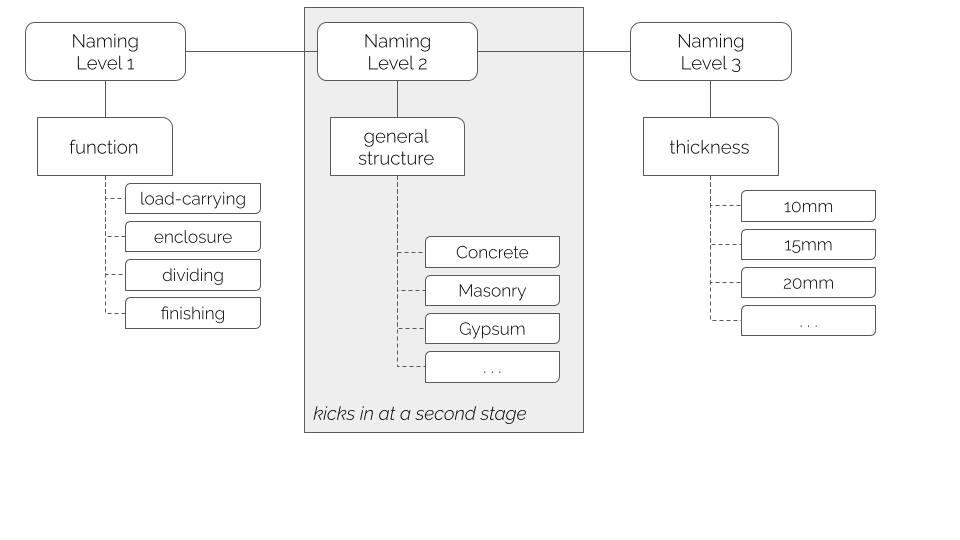
If we follow this reasoning down to its logical consequence, it means that some parts of our naming convention might be optional, depending on the Level of Development of the object that’s being named. More than that. It means that we could spot the Level of Development of an object based on the complexity of its naming only.
At certain points in the design process, we know that objects need to be revised and further refined. Hipothesys need to be challenged and confirmed, additional analysis and calculations need to be performed, and they can only be performed at this point because… well, because this is the point we get paid for this, and also because it’s wasted energy to perform them before the general concept has been approved.
In summary, a naming convention that’s designed for propagation helps people to find their stuff while they’re modelling and also helps people find it while they’re upgrading their design to the next level. Isn’t that great?
Yoshitaka Amano‘s Angel’s Egg, it’s the simple answer: a 1985 animated movie directed by Mamoru Oshii (Ghost in the Shell). Following Amano’s exhibition here in Italy and the movie’s anniversary, it had been re-released in theatres but I had missed, I was curious, so I
“Advanced BIM”: what does that even mean? “Advanced BIM” is one of those expressions that sound authoritative and yet, when you ask what it actually describes, the answers become very vague very quickly. The statement doesn’t mean anything, and it drives me crazy equally quickly.
…doesn’t necessarily stay in February, so here’s a few highlights. I saw art exhibitions, read books and comics, had a birthday, did a great football event with my team and bla bla bla, who cares. Here’s the stuff you might have seen on Instagram, but
Yoshitaka Amano‘s Angel’s Egg, it’s the simple answer: a 1985 animated movie directed by Mamoru Oshii (Ghost in the Shell). Following Amano’s exhibition here in Italy and the movie’s anniversary, it had been re-released in theatres but I had missed, I was curious, so I
“Advanced BIM”: what does that even mean? “Advanced BIM” is one of those expressions that sound authoritative and yet, when you ask what it actually describes, the answers become very vague very quickly. The statement doesn’t mean anything, and it drives me crazy equally quickly.
…doesn’t necessarily stay in February, so here’s a few highlights. I saw art exhibitions, read books and comics, had a birthday, did a great football event with my team and bla bla bla, who cares. Here’s the stuff you might have seen on Instagram, but
We use cookies on our website to give you the most relevant experience by remembering your preferences and repeat visits. By clicking “Accept”, you consent to the use of ALL the cookies.
This website uses cookies to improve your experience while you navigate through the website. Out of these cookies, the cookies that are categorized as necessary are stored on your browser as they are essential for the working of basic functionalities of the website. We also use third-party cookies that help us analyze and understand how you use this website. These cookies will be stored in your browser only with your consent. You also have the option to opt-out of these cookies. But opting out of some of these cookies may have an effect on your browsing experience.
Necessary cookies are absolutely essential for the website to function properly. This category only includes cookies that ensures basic functionalities and security features of the website. These cookies do not store any personal information.
Any cookies that may not be particularly necessary for the website to function and is used specifically to collect user personal data via analytics, ads, other embedded contents are termed as non-necessary cookies. It is mandatory to procure user consent prior to running these cookies on your website.









No Comments